
Table of Contents
- What Gemini Nano Actually Is — and Why It Runs on the Phone
- How to Enable Gemini Nano on Your Pixel: The Exact Steps
- Enabling on-device AI step by step
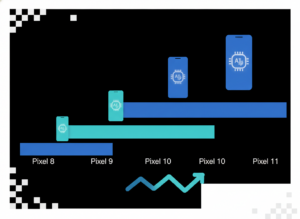
- Pixel 8 to Pixel 11: Which Devices Get Which Gemini Nano Version
- What On-Device AI Actually Does on a Pixel Today
- Features that run locally through Gemini Nano
- How Gemini Nano Got Faster: Nano v3, Nano v4 and the November 2026 Pixel Drop
- Timeline: Gemini Nano from the Pixel 8 Pro to the November 2026 Pixel Drop
- Cost, Context Window and Privacy: The On-Device Trade-Off in Numbers
- Troubleshooting: The Toggle Is On but Nothing Works
- Fix an inactive on-device AI toggle, in order
- Frequently Asked Questions
- Does the Pixel 8 still support Gemini Nano in 2026?
- Is Gemini Nano free to use on a Pixel?
- Does Gemini Nano work without an internet connection?
- Why doesn't my Pixel 9 get Rambler or Create My Widget?
- Does enabling on-device GenAI features drain the battery?
- How do I confirm the Gemini Nano models finished downloading?
- Is Gemini Nano the same as the Gemini app on my Pixel?
- Limitations, Risks and Alternatives Worth Knowing
- Conclusion
- References
- Related Reading
Key Takeaway
>
How to Use Gemini Nano on Your Pixel: Enabling On-Device AI from the Pixel 8 to the Pixel 11 comes down to one hidden menu: on most Pixel 8, 8a and 9 handsets you switch the model on manually through Settings > About Phone (tap Build Number seven times) > System > Developer options > AICore Settings > “Enable on-device GenAI Features,” then let the model download over Wi-Fi. The Pixel 10 and Pixel 11 ship with Nano v3 and Nano v4 already active, and the Pixel 11 gained an “Enable AICore Developer Preview” toggle on November 8, 2026. Gemini Intelligence, however, requires a flagship SoC, at least 12GB of RAM and Nano v3 or newer.
This guide covers How to Use Gemini Nano on Your Pixel: Enabling On-Device AI from the Pixel 8 to the Pixel 11 — the exact toggle path, which handset gets which model version, and which features actually execute without a connection. The stakes are practical rather than abstract: Google moved inference onto the Tensor NPU through the Android AICore service, which means prompts never leave the handset, and therefore the feature costs nothing to run and functions in airplane mode.
The complication is fragmentation. Gemini Nano debuted on the Pixel 8 Pro in late 2023 as a developer-gated experiment, but the 12GB RAM and Nano v3 floor Google set with the Pixel 10 in August 2025 locked the Pixel 9 out of the Gemini Intelligence tier entirely — including Rambler and Create My Widget. By the end of this piece you will know how to enable the feature, how to confirm the models finished downloading, and exactly what your specific model is entitled to.
About the Author
>
Written by The Tech ABC Editorial Team, which covers consumer hardware and the AI features shipping inside it. Our device coverage is hands-on and buyer-focused: what a feature does, what it costs, and who actually gets it.
Everything You Need to Know About the Nintendo Switch 2
Transparency
>
This article describes Android settings paths and feature availability as documented as of November 17, 2026. Menu labels vary by carrier build and region, and Google withdraws developer-preview builds without notice. Nothing here is a recommendation to purchase a specific device — see our disclaimer.
What Gemini Nano Actually Is — and Why It Runs on the Phone
Gemini Nano is Google’s smallest Gemini model, compiled to run entirely on a Pixel’s Tensor NPU through the Android AICore system service rather than on Google’s servers. Because inference happens locally, no prompt or output is transmitted off the handset, which means the feature works with the radios switched off and generates no billing.
Google had strong incentives to build it this way. On-device execution removes per-token server cost and removes the data-transfer step that creates privacy and compliance exposure; consequently Google can hand summarization, proofreading and smart replies to third-party apps through the ML Kit GenAI APIs without metering them. That design choice aligns with the trustworthy-AI principles set out in the National Institute of Standards and Technology’s AI framework work, which favours minimizing data movement and documenting model behaviour, and with research published by Stanford’s Institute for Human-Centered AI on how local inference narrows the attack and disclosure surface compared with cloud calls. The trade-off is real and the following sections quantify it: Nano’s effective context window sits at roughly 4,096 tokens, far below the 1M-plus available on cloud-based Gemini 1.5 Pro.
How to Enable Gemini Nano on Your Pixel: The Exact Steps
How to Use Gemini Nano on Your Pixel: Enabling On-Device AI from the Pixel 8 to the Pixel 11 runs through the hidden developer options menu, following the path Settings > About Phone > Build Number ×7 > System > Developer options > AICore Settings. The shape of that route is identical across the Pixel 8, 8a, 9, 10 and 11 — only the name of the toggle at the end of it changes by generation.
Enabling on-device AI step by step
- Open Settings > About Phone and tap Build Number seven times until the “You are now a developer” confirmation appears.
- Go back to Settings > System > Developer options and scroll to AICore Settings.
- On a Pixel 8, 8a or 9, switch on “Enable on-device GenAI Features.”
- On a Pixel 11 or Pixel 11 Pro Fold running the November 8, 2026 update, switch on “Enable AICore Developer Preview” to test Gemini Nano v4 builds.
- Connect to Wi-Fi and leave the phone charging while AICore downloads the foundational models through Google Play system updates.
- Reboot, then confirm availability by triggering an on-device feature such as Recorder summarization or Gboard smart reply with mobile data and Wi-Fi switched off.
What happens after the toggle matters as much as the toggle itself. Flipping it triggers a model download delivered through Google Play system updates rather than the monthly security patch, therefore the device needs Wi-Fi and charge, and the dependent features stay greyed out until that fetch completes. On the Pixel 10 and Pixel 11 the foundational models are already resident because Google ships them as part of the OS image, which means the developer toggle on those devices adds preview builds rather than switching the base capability on. That distinction explains why Pixel 11 owners who flip the preview switch sometimes see no change at all: the stable Nano v4 path was already running underneath.
Pixel 8 to Pixel 11: Which Devices Get Which Gemini Nano Version
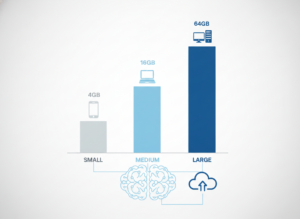
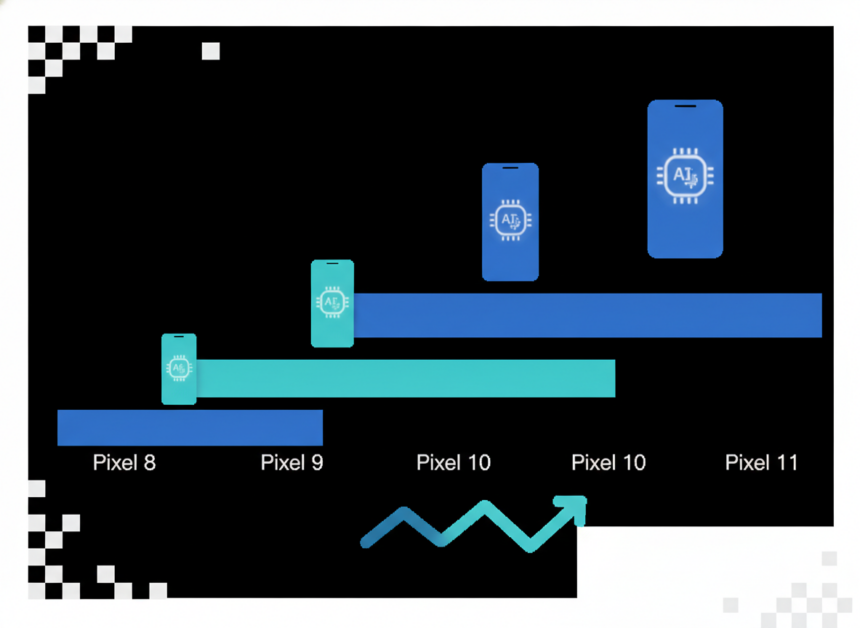
Every Pixel from the Pixel 8 Pro onward runs some build of Gemini Nano, but only devices with a flagship SoC, at least 12GB of RAM and Nano v3 or newer qualify for the Gemini Intelligence feature tier.
| Pixel model | SoC | Gemini Nano version | RAM | Gemini Intelligence eligible |
|---|---|---|---|---|
| Pixel 8 / 8 Pro (2023) | Tensor G3 | Nano (original) | Not stated | No |
| Pixel 8a (2024) | Tensor G3 | Nano (original) | Not stated | No |
| Pixel 9 / 9 Pro (2024) | Tensor G4 | Nano v2 | Not stated | No |
| Pixel 10 / 10 Pro / 10 Pro XL (Aug 2025) | Tensor G5 | Nano v3 | 12GB minimum | Yes |
| Pixel 11 / 11 Pro Fold (Aug 2026) | Tensor G6 (3nm) | Nano v4 | 12GB minimum | Yes |
Google set that 12GB floor with the Pixel 10 in August 2025 because Nano v3 must stay resident in memory to respond without a cold-load delay; older and mixed 8GB configurations were therefore excluded outright rather than throttled. Sustained-workload limits reinforce the decision — independent test labs such as Micom Labs handle the thermal and RF compliance testing that constrains how hard a phone SoC is permitted to run continuously, and a model held in RAM avoids repeated high-power load cycles. The consequence is awkward for owners: the Pixel 9, a 2024 flagship, is locked out of Rambler and Create My Widget, while newer mid-tier handsets from Honor, iQOO and Motorola were added to the Nano v4 support list on November 10, 2026.
What On-Device AI Actually Does on a Pixel Today
The features below execute with no network connection at all once the models are resident, which is the only reason the toggle is worth finding.
Features that run locally through Gemini Nano
- Recorder transcript summaries, generated with the radios switched off
- Gboard smart replies and tone-aware proofreading inside third-party messaging apps
- Rambler natural-speech voice input with conversational editing (Pixel 11, Nano v4)
- Proactive Assistance suggestions, the renamed successor to Magic Cue
- Third-party app summarization and rewriting delivered through the ML Kit GenAI APIs
- Create My Widget generation on Gemini Intelligence-eligible hardware
iPhone 17 Colors: Expected Variants and Themes
Image and video generation remain a separate matter, because generative media models are substantially larger than Nano — our coverage of Imagen 3 on Android explains where that workload actually runs. Apple has pursued a comparable split between local and server processing, visible in the iPhone 17 camera AI features that handle scene analysis on-device. And one caution applies across the board: analysts at LumiChats noted in August 2026 that the agentic demonstrations — booking a ride, ordering groceries across 40-plus apps — still route through the cloud, which means the offline guarantee covers transcription, summarization and drafting, not multi-app automation.
How Gemini Nano Got Faster: Nano v3, Nano v4 and the November 2026 Pixel Drop
Timeline: Gemini Nano from the Pixel 8 Pro to the November 2026 Pixel Drop
- Late 2023 — Gemini Nano debuts on the Pixel 8 Pro as a limited, developer-gated experiment.
- 2024 — The Pixel 9 series ships with Nano v2: faster, but below the Nano v3 floor later required for Gemini Intelligence.
- August 2025 — The Pixel 10 launches on Android 16 and Tensor G5 with Nano v3, and Google sets the flagship-SoC plus 12GB RAM requirement.
- June 2026 — Google publishes the Multi-Token Prediction retrofit that speeds up frozen Nano v3 models on existing Pixel 9 and 10 hardware.
- August 2026 — The Pixel 11 arrives with the 3nm Tensor G6 and Nano v4, introducing Rambler and Proactive Assistance.
- November 8–10, 2026 — Google adds the “Enable AICore Developer Preview” toggle and lists the Pixel 11, Pixel 11 Pro Fold, Honor Magic 7 and iQOO 15 as Nano v4 devices.
The June 2026 result is the most consequential entry on that list for owners of older hardware. Google researchers Eden Cohen and Michelle Ramanovich published a method for retrofitting multi-token prediction onto frozen Nano v3 weights. Because a standard language model emits one token per forward pass, it leaves the NPU idle between steps and wastes both throughput and battery; predicting several tokens per pass therefore produced what the researchers described as an out-of-the-box speedup on Pixel 9 and Pixel 10 hardware without breaching thermal or RAM ceilings. The broader method class is documented in on-device inference papers published through arXiv, and peer-reviewed work on model compression in the European Journal of Engineering and Computer Sciences supports the underlying efficiency trade-off: quantized small models buy latency and power headroom by surrendering context length.
That research fed directly into distribution. The November 2026 Pixel Drop extended Gemini Intelligence to the Pixel 10 line and the Motorola Signature 27, and Google product director Karthik Thirumalai confirmed on November 10, 2026 that multi-step app automation and Create My Widget were reaching additional locales and devices. The effect is that the eligibility table above is a moving target rather than a fixed specification — a pattern consistent with the wider tech trends and innovations pushing inference down onto client silicon.
Cost, Context Window and Privacy: The On-Device Trade-Off in Numbers
Gemini Nano costs nothing per token and never transmits data, but its roughly 4,096-token effective context window cannot hold a long document or a sprawling chat history, and Google therefore routes long-form work to the cloud.
| Metric | Gemini Nano (on-device) | Cloud Gemini |
|---|---|---|
| Cost per 1M tokens | $0.00 | Metered by tier |
| Effective context window | ~4,096 tokens | 1M+ tokens (Gemini 1.5 Pro) |
| Data leaves the device | No | Yes |
| Works offline | Yes, after model download | No |
| Processing hardware | Local NPU/TPU via AICore | Google data centre |
That $0.00 figure comes from a late-2026 Hokai analysis of Nano’s operating cost, and it explains developer behaviour: third-party teams adopted the ML Kit GenAI APIs for summarization and proofreading in late 2025 and 2026 instead of paying for cloud calls, which standardized basic AI features across the Android ecosystem at zero marginal cost. The security argument runs parallel. Guidance from the Cybersecurity and Infrastructure Security Agency consistently emphasises reducing data exposure in transit, and keeping prompts on the handset removes that exposure entirely. Analysis published by Lawfare on AI and privacy regulation makes the regulatory consequence explicit: local processing reduces compliance obligations under GDPR-style data-protection regimes because there is no transfer, no retention and no third-party processor to account for.
Troubleshooting: The Toggle Is On but Nothing Works
Fix an inactive on-device AI toggle, in order
- Confirm the Google Play system update date in Settings > Security & privacy > System & updates — AICore models arrive through that channel, not the monthly OS patch.
- Join Wi-Fi and charge the phone, because model downloads are deferred on metered connections and low battery.
- Clear storage for the Android AICore app in Settings > Apps, then reboot to force a fresh model fetch.
- Check your region: Gemini Intelligence rolled out locale by locale through November 2026, so an unsupported locale disables features the toggle still displays.
- Turn the developer preview toggle off and back on, since preview builds are periodically withdrawn and replaced server-side.
If that checklist fails on a Pixel 8 or 8a, the limit is hardware rather than configuration, because the model cannot stay resident in memory on those configurations — which means a factory reset will not help.
Frequently Asked Questions
Does the Pixel 8 still support Gemini Nano in 2026?
Yes, but only the original Nano feature set. The Pixel 8 and 8 Pro run Nano through the manual “Enable on-device GenAI Features” toggle in AICore Settings. Because they sit below the 12GB RAM and Nano v3 floor Google established in August 2025 with the Pixel 10, they do not receive Gemini Intelligence features such as Rambler or Create My Widget.
Is Gemini Nano free to use on a Pixel?
Yes — no subscription and no per-use charge. Inference runs on the device’s own NPU through AICore, so there is no server-side billing; a late-2026 Hokai analysis measured the operating cost at $0.00 per million tokens. Cloud-dependent Gemini features are governed by separate Google One AI tiers and are priced independently of Nano.
Does Gemini Nano work without an internet connection?
Yes, once the models have downloaded. Recorder summaries, Gboard proofreading and Pixel 11 Rambler voice input all execute locally on the Tensor NPU. The one-time model download requires Wi-Fi, and multi-step agentic automation across apps still calls Google’s servers, which means those specific features fail with the radios off.
Why doesn’t my Pixel 9 get Rambler or Create My Widget?
Because the Pixel 9 ships with Nano v2 and falls below Google’s Gemini Intelligence hardware floor. That floor — a flagship SoC, at least 12GB of RAM and Nano v3 or newer — was set with the Pixel 10 in August 2025. As a result a 2024 flagship is excluded, while newer mid-tier handsets added to the support list in November 2026 qualify.
Does enabling on-device GenAI features drain the battery?
The toggle itself costs nothing; running inference does. Each generation spins up the NPU, therefore heavy summarization sessions show measurable drain. Google’s June 2026 Multi-Token Prediction retrofit reduced that cost on Pixel 9 and Pixel 10 hardware because the model emits several tokens per forward pass instead of one.
How do I confirm the Gemini Nano models finished downloading?
Switch off Wi-Fi and mobile data, then run an on-device task such as a Recorder summary. If it completes, the models are resident. Alternatively, check the Android AICore app’s storage size in Settings > Apps alongside the Google Play system update date, because the models arrive through that update channel rather than the OS patch.
Is Gemini Nano the same as the Gemini app on my Pixel?
No. The Gemini app is a front end for Google’s cloud models, while Gemini Nano is a compact model running on the phone through AICore and surfacing inside system features and third-party apps. Consequently Nano powers quiet, offline capabilities such as summarization and proofreading rather than the chat interface itself.
Limitations, Risks and Alternatives Worth Knowing
The roughly 4,096-token context window rules out long-document work, so feeding Nano a contract or a research paper will not produce a usable summary. Developer-preview builds are unfinished by design and Google withdraws them server-side without notice, which means a feature working today can disappear after a silent model swap. Menu labels also differ across carrier builds, so the AICore Settings entry occasionally sits under a different heading. The more serious risk is accuracy: compact models hallucinate, and research from Stanford HAI on the evaluation limits of small language models indicates that confident-sounding output is not evidence of correctness. Ethics guidance from the Society of Professional Journalists supports the sensible rule here — verify AI-assisted summaries of medical, legal or financial material against the source before acting on them.
The alternatives are straightforward. For long documents, the cloud Gemini app or a desktop model handles context Nano cannot. For strict privacy with no vendor dependency, running open-weight models such as Llama 4 locally on a laptop is a workable route. For Pixel 8 and Pixel 9 owners who want Gemini Intelligence features, the honest answer is that the hardware floor cannot be worked around, therefore the real decision is an upgrade rather than a settings change. Critics on tech forums in November 2026 called that fragmentation arbitrary, and on the available evidence the complaint is reasonable.
Conclusion
How to Use Gemini Nano on Your Pixel: Enabling On-Device AI from the Pixel 8 to the Pixel 11 reduces to a single operative fact: the toggle lives in AICore Settings, and what it unlocks depends entirely on your silicon. On a Pixel 10 or Pixel 11 the capability is already active and worth using daily, because Nano v3 and Nano v4 stay resident and deliver Rambler, Proactive Assistance and Create My Widget without a connection. On a Pixel 8 or Pixel 9 the toggle delivers real but narrow value, since Google’s 12GB RAM and Nano v3 floor caps the feature set regardless of configuration. The November 2026 pattern is instructive — eligibility widened to the Pixel 10 line and to third-party flagships including the Honor Magic 7, iQOO 15 and Motorola Signature 27, which means the support list will keep moving with each feature drop.
ChatGPT Overload! When Does Daily Use Turn Into Addiction?
References
- National Institute of Standards and Technology — Artificial Intelligence: https://www.nist.gov/artificial-intelligence
- Stanford Institute for Human-Centered Artificial Intelligence (HAI): https://hai.stanford.edu/
- arXiv — on-device inference and multi-token prediction research: https://arxiv.org/
- European Journal of Engineering and Computer Sciences: https://www.ejecs.org/
- Cybersecurity and Infrastructure Security Agency (CISA): https://www.cisa.gov/
- Lawfare — AI and privacy regulation analysis: https://www.lawfaremedia.org/
- Micom Labs — compliance and thermal testing practice: https://micomlabs.com/
- Society of Professional Journalists — ethics guidance: https://www.spj.org/