
Table of Contents
- What Is the Difference Between Refresh Rate and Polling Rate?
- How 1,040Hz Monitors Broke the 1,000Hz Barrier
- What the Extra Hertz Buys You
- Why OLED Still Competes at Lower Hertz
- How 8,000Hz Mice Became the 2026 Standard
- The Latency Math
- The CPU Bottleneck Nobody Advertises
- Do 1,040Hz Monitors and 8,000Hz Mice Actually Need Each Other?
- The Consensus Sweet Spot
- What the Pros Actually Use
- Which Setup Makes Sense for You?
- Frequently Asked Questions
- Limitations of This Analysis
- The Bottom Line
- References
- Related Reading
Key Takeaway: The refresh rate vs polling rate distinction comes down to which end of the pipeline you are measuring: polling rate is how often your mouse tells the PC where it is, and refresh rate is how often your monitor draws what the PC calculated. In 2026, 1,040Hz monitors like the Samsung Odyssey G6 and TCL 27P2A Ultra draw a frame every 0.96ms, while 8,000Hz mice such as the Logitech G PRO X2 SUPERSTRIKE report every 0.125ms. The two specs only pay off together — and only if you accept 720p resolution and own a CPU strong enough to absorb 8,000 inputs per second.
>
- Polling rate = mouse-to-PC reporting interval; refresh rate = PC-to-screen drawing interval
- 1,040Hz is currently achievable only by dropping resolution to 720p on dual-mode panels
- Moving from 1,000Hz to 8,000Hz polling cuts latency by roughly 0.875ms, not milliseconds
- 8,000Hz polling taxes the CPU heavily, which causes FPS drops in unoptimized games
- For most players, 1,000Hz to 4,000Hz polling on a 240Hz–360Hz display is the practical sweet spot
>
The bleeding edge works, but it works for a narrow slice of competitive players.
Two numbers dominated gaming hardware marketing through late 2025 and 2026: 1,040Hz and 8,000Hz. One belongs to monitors, the other to mice, and the industry has spent the past year selling them as a matched pair. The pitch is seductive — eliminate the last fractions of a millisecond between your hand moving and a pixel changing on screen.
The reality is more complicated, because each number carries a cost the box never mentions. Hitting 1,040Hz requires dropping your game to 720p. Running 8,000Hz polling requires a CPU with headroom to spare, and when that headroom is not there, framerates collapse. Understanding the refresh rate vs polling rate relationship is what separates a genuine competitive upgrade from an expensive specification you cannot use.
This piece breaks down what each metric actually governs, which hardware shipped in 2025 and 2026, where the returns stop being worth the trade-offs, and what configuration makes sense at each tier of setup.
About the Author: This analysis was produced by The Tech ABC Editorial Team, which covers displays, peripherals and PC components with a focus on what specifications mean for buyers rather than what they mean on a spec sheet.
This Is Why Photoshop Isn’t Your Only Option Anymore
Transparency Note: All hardware figures, release timings and latency measurements in this article come from publicly reported product launches and third-party testing outlets cited inline. The Tech ABC did not conduct independent latency measurements for this piece. No manufacturer provided compensation or review units in connection with this article.
What Is the Difference Between Refresh Rate and Polling Rate?
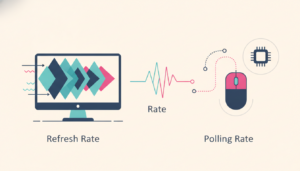
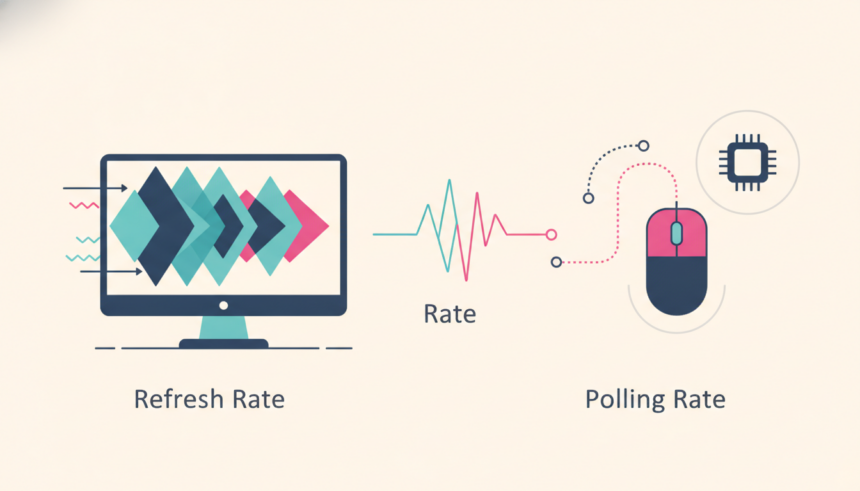
Refresh rate measures how often your monitor draws a new image; polling rate measures how often your mouse reports its position and click state to the PC. Both are expressed in Hertz, which is why they get conflated — but they sit at opposite ends of the input-to-display chain, and improving one without the other produces no visible benefit.
Polling rate governs the input side. A standard 1,000Hz mouse sends a report to the PC every 1 millisecond. An 8,000Hz mouse sends one every 0.125ms. That data tells the game engine where your crosshair should be and whether you have clicked.
Refresh rate governs the output side. A 240Hz monitor redraws the screen every 4.17ms. A 1,040Hz monitor redraws every 0.96ms. The display can only show positional data the PC already has, which means a monitor refreshing faster than your mouse reports is waiting on stale coordinates between frames.
| Metric | What It Measures | 1,000Hz / Standard | 8,000Hz / 1,040Hz |
|---|---|---|---|
| Polling rate | Mouse reports to PC | Every 1.0ms | Every 0.125ms |
| Refresh rate | Monitor draws a frame | 240Hz = every 4.17ms | 1,040Hz = every 0.96ms |
| Primary cost | — | Negligible | CPU load / 720p resolution |
The practical consequence is a matching problem. Pair an 8,000Hz mouse with a 144Hz monitor and the extra positional data has nowhere to go, because the panel only asks for a new image 144 times per second. Pair a 1,000Hz mouse with a 1,040Hz monitor and the opposite failure occurs: the monitor requests a frame every 0.96ms while the mouse reports every 1.0ms, resulting in frames drawn from coordinates the mouse has not yet updated.
How 1,040Hz Monitors Broke the 1,000Hz Barrier
The jump past 1,000Hz happened because panel makers stopped trying to run their native resolution at extreme speeds and shipped dual-mode toggles instead. That engineering decision is the entire story of 2026’s fastest displays.
Samsung unveiled the Odyssey G6 (G60H) ahead of CES 2026 in December 2025. The 27-inch panel runs natively at QHD 1440p and 600Hz, but a dual-mode switch drops it to 720p to reach 1,040Hz. FlatpanelsHD and Tom’s Hardware both covered the launch, which established the template every rival followed.
TCL answered in March 2026 with the 27P2A Ultra, the first Mini-LED monitor to clear 1,000Hz. It runs 550Hz at 2K natively and switches to 1,040Hz at 720p. The Mini-LED backlight gives TCL a measurable brightness advantage over Samsung’s IPS implementation, which matters in bright rooms where IPS panels wash out.
What the Extra Hertz Buys You
The latency gain is real but small. According to PCMag’s March 2026 analysis, moving from 500Hz to 1,000Hz or above shaves roughly 1 to 2 milliseconds off total input lag. That is a meaningful figure in a CS2 peek duel and an invisible one in a single-player campaign.
The compromise is the resolution. Because 1,040Hz currently requires 720p, these panels serve a specific use case: professional esports titles where players already lower settings to reduce visual clutter. Anyone running Valorant at 720p on a 27-inch screen has accepted a trade most buyers will not.
Why OLED Still Competes at Lower Hertz
OLED panels top out around 480Hz to 720Hz in 2026, yet reviewers consistently rate their motion clarity as competitive with faster LCDs. The reason is pixel response time: OLED transitions in roughly 0.03ms, which means almost no smearing between frames. TFTCentral has documented this gap between raw refresh numbers and perceived clarity across multiple panel generations.
Consequently, a 480Hz OLED at full 1440p often delivers a better overall experience than a 1,040Hz LCD at 720p — because you keep the resolution, the contrast and the response time simultaneously.
How 8,000Hz Mice Became the 2026 Standard
8,000Hz polling moved from a wired novelty to the wireless flagship default during 2026, driven by wireless dongle bandwidth improvements and sensor upgrades that made the data rate sustainable without destroying battery life.
The Logitech G PRO X2 SUPERSTRIKE launched in late 2026 with native 8,000Hz wireless polling enabled out of the box. RTINGS tested it in September 2026 and recorded some of the lowest click and sensor latency figures available in their database.
How Does Keeping Your iPhone at 100% Kill Its Battery?
Razer held its position with the Viper V4 Pro and DeathAdder V4 Pro, both running 8KHz wireless as the competitive baseline. The more consequential shift happened at the bottom of the market: MCHOSE (L7 Pro), SCYROX (V8) and Attack Shark (X3 Pro) brought 8,000Hz polling below $100 in 2026, which collapsed the price premium that had made the feature aspirational.
The Latency Math
Dropping from a 1,000Hz reporting interval to 8,000Hz cuts the gap between reports from 1.0ms to 0.125ms — a difference of 0.875ms. Standesk’s 2026 analysis frames that figure as the central reason most gamers overestimate the upgrade: the headline number multiplies by eight, but the latency reduction is under a millisecond.
That sub-millisecond gain becomes perceptible mainly on displays running 360Hz or higher, paired with a PC that has the processing budget to handle the input flood.
The CPU Bottleneck Nobody Advertises
Processing 8,000 inputs per second is a real workload, and it lands on the CPU. Tech analysts and the r/MouseReview community reported throughout 2026 that 8KHz polling triggers severe framerate drops and micro-stuttering in unoptimized titles, because the input thread competes with the game’s own processing for the same cores.
The effect is counterproductive: a setting marketed as a latency reduction increases frame time variance, which players feel as stutter. This is why the most reliable configuration advice in 2026 is to test 8KHz per-game rather than enabling it globally. If your framerate drops, the polling rate is costing you more than it returns — and if you are still weighing component choices, our breakdown of how many watts the RTX 5080 really needs for peak performance covers the other half of that headroom equation.
Do 1,040Hz Monitors and 8,000Hz Mice Actually Need Each Other?
Yes — and that mutual dependency is the most practical thing to understand about the refresh rate vs polling rate comparison. Each specification is close to worthless without the other, which means buying one in isolation wastes money.
Run an 8,000Hz mouse on a 144Hz or 240Hz panel and the monitor simply cannot display the additional positional updates. The data arrives and is discarded, because the display has no frame slot to put it in.
The reverse case is more damaging. At 1,040Hz, the monitor requests a new frame every 0.96ms. A 1,000Hz mouse reporting every 1.0ms is therefore slower than the display, resulting in dropped inputs that fall between frames. For anyone who has actually bought a 1,040Hz panel, an 8,000Hz mouse stops being a luxury and becomes mathematically necessary.
The Consensus Sweet Spot
The analyst consensus in late 2026 points to 1,000Hz to 4,000Hz polling as the best balance of performance, battery life and system compatibility for the vast majority of players. The jump from 1,000Hz to 8,000Hz delivers a far smaller real-world gain than marketing materials imply, and it arrives with a CPU tax.
What the Pros Actually Use
Top-tier CS2 professionals including Ropz and ZywOo have adopted 8KHz mice despite the skepticism, because their entire competitive context rewards fractional-millisecond advantages. They also run on sponsored, high-end systems where the CPU overhead is absorbed without framerate loss — a condition most readers do not share.
“The improvement in input latency from 1000Hz to 8000Hz is relatively small and is primarily noticeable for competitive players with high-refresh-rate monitors and powerful PCs.”
— Standesk, 2026 polling rate analysis
Which Setup Makes Sense for You?
Match your peripherals to your display tier, because mismatched specifications produce no benefit at either end.
- 60Hz–144Hz display: 1,000Hz polling is sufficient. Higher polling adds CPU load with nothing to show for it.
- 240Hz–360Hz display: 1,000Hz to 4,000Hz polling. This is the mainstream competitive configuration in 2026.
- 500Hz+ display: 4,000Hz to 8,000Hz polling, provided your CPU holds framerates steady.
- 1,040Hz dual-mode display at 720p: 8,000Hz polling is required, not optional.
Our broader gaming news and reviews coverage tracks these hardware tiers as new panels and sensors ship.
Frequently Asked Questions
Is a 1,040Hz monitor worth buying in 2026?
Only for competitive esports players willing to game at 720p. The 1,040Hz mode on the Samsung Odyssey G6 and TCL 27P2A Ultra requires dropping resolution, and PCMag’s March 2026 testing put the latency gain over 500Hz at roughly 1 to 2 milliseconds. Most buyers get more from a 480Hz OLED at native resolution.
Does 8,000Hz polling rate hurt FPS?
It can, significantly. Processing 8,000 reports per second loads the CPU, and reports throughout 2026 from analysts and r/MouseReview document framerate drops and micro-stuttering in unoptimized games. Test it per title. If frametimes worsen, drop to 4,000Hz or 1,000Hz — the latency you lose is under a millisecond.
What polling rate should I use with a 240Hz monitor?
1,000Hz to 4,000Hz. A 240Hz panel draws a frame every 4.17ms, so reports arriving every 0.125ms far exceed what the display can show. The 1,000Hz–4,000Hz range preserves battery life on wireless mice and avoids unnecessary CPU overhead.
Are cheap 8,000Hz mice any good?
The 2026 budget wave from MCHOSE, SCYROX and Attack Shark brought 8KHz below $100, which removed the price barrier. These deliver the polling spec, though build quality, sensor consistency and software support generally trail flagships like the Logitech G PRO X2 SUPERSTRIKE.
Limitations of This Analysis
Research limitations: The latency figures cited here come from third-party outlets including PCMag, RTINGS and TFTCentral rather than independent testing by The Tech ABC. Input lag measurements vary with test methodology, game engine, GPU driver version and system configuration, which means published numbers should be read as directional rather than absolute. The CPU overhead associated with 8,000Hz polling has been widely reported by analysts and user communities, but no standardised cross-game benchmark suite exists for it, so the severity differs by title and by processor.
Alternative approaches: Reducing total input lag does not begin and end with peripherals. Lowering in-game graphical settings, enabling low-latency driver modes, capping framerate below your monitor’s maximum and reducing background CPU load each contribute measurable reductions — often more than the 0.875ms available from a polling rate upgrade. Readers chasing motion clarity specifically should weigh OLED response time against LCD refresh rate before assuming higher Hertz is the deciding factor.
When to seek further guidance: Before committing to a 1,040Hz panel or an 8,000Hz wireless mouse, check whether your CPU and GPU can sustain framerates near those ceilings in the specific games you play. Reviews that include frametime graphs rather than average FPS are the most useful reference, and manufacturer compatibility notes are worth reading for USB polling requirements on older motherboards.
The Bottom Line
The refresh rate vs polling rate debate resolves into a single practical rule: these numbers only matter in proportion to each other, and both only matter if your system can feed them. 1,040Hz monitors genuinely draw frames every 0.96ms, and 8,000Hz mice genuinely report every 0.125ms — the specifications are not marketing fiction.
What is marketing fiction is the implication that either number transforms the experience of a typical player. The gain from 1,000Hz to 8,000Hz polling is 0.875ms, and 1,040Hz costs you 720p resolution. For the overwhelming majority of gamers in 2026, a 240Hz to 360Hz display paired with 1,000Hz to 4,000Hz polling captures nearly all of the available benefit without the CPU tax or the resolution sacrifice.
If you are a ranked esports player on a high-end CPU, the bleeding edge earns its price. Everyone else should spend the difference on resolution, panel quality or a better GPU.
Read more display and peripheral analysis in our tech trends and innovations section.
References
- FlatpanelsHD — Samsung Odyssey G6 (G60H) 1,040Hz dual-mode announcement, December 2025. Link
- Tom’s Hardware — Coverage of 1,000Hz+ dual-mode monitor launches, 2026. Link
- PCMag — Analysis of input lag reduction from 500Hz to 1,000Hz+ displays, March 2026. Link
- TFTCentral — Panel technology and pixel response time comparisons. Link
- RTINGS — Logitech G PRO X2 SUPERSTRIKE click and sensor latency testing, September 2026. Link
- Standesk — “Is 8000 Hz Polling Rate Worth It in 2026? What Most Gamers Get Wrong,” 2026. Link
- Reddit r/MouseReview — Community reports on 8,000Hz polling CPU overhead and framerate impact, 2026. Link
- Gizmochina — TCL 27P2A Ultra Mini-LED 1,040Hz announcement, March 2026. Link